Upgrade to the Latest DiskWarrior
All New Design, Even Better Performance.
What's New in DiskWarrior?
DiskWarrior 5 is now the one utility program that solves all of the common problems you'll likely encounter on your Mac. Just look at these new features:
• 64-Bit
Today's large disks can have large directories. Using the latest 64-bit technology allows DiskWarrior 5 to handle even the largest disks.
• Ships on a bootable flash drive to repair your startup disk
Flash drives start up much faster than DVDs and can be updated as needed.
• Includes the new DiskWarrior Recovery Maker
New Macs have new macOS startup requirements. DiskWarrior Recovery Maker updates your DiskWarrior Recovery flash drive with the latest macOS.
• Runs from macOS Recovery (Recovery HD)
In an emergency, you no longer need a separate startup disk to run DiskWarrior on your startup disk unless your startup disk has partition table damage.
• Repairs partition table damage
Sometimes the damage is to the map that describes all your drive's partitions which makes all your partitions unavailable. DiskWarrior 5 can repair standard Mac GUID partition tables when started from the DiskWarrior Recovery flash drive.
• New architecture
Updated to use the newest macOS technologies while still supporting older PowerPC* and Intel Macs that can no longer run the latest macOS.
• Significantly faster
For many disks, directory rebuilding is twice as fast as the previous version.
• Recovers more data from drives with hardware malfunctions
Recover your important files from most failing drives, possibly saving you thousands of dollars in professional recovery costs.
• Detects and repairs more disk problems than ever
The best is even better.
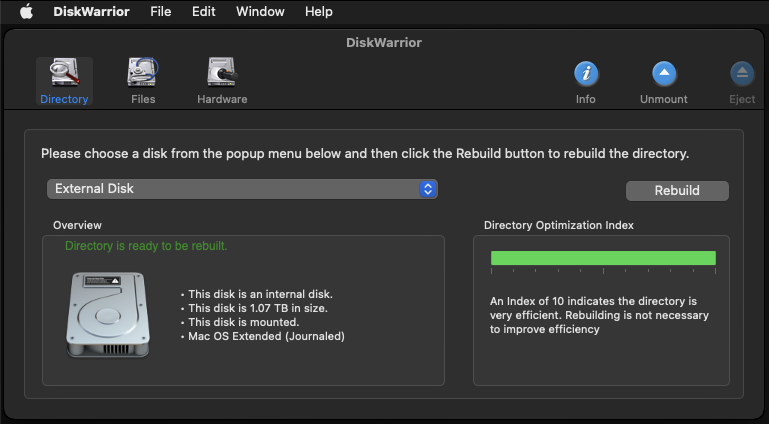
• New Directory Optimization Index
You can tell how efficient your directories are at a glance.
• Repairs Time Machine backup disks
Drives containing Time Machine back ups can have enormous directories that were often too large for DiskWarrior 4. The 64-bit memory addressing of DiskWarrior 5 allows these drives to be repaired or recovered.
• Plus a lot more
Purchase a new copy or upgrade now from older versions of DiskWarrior.
* Please note that to install DiskWarrior 5, your Mac must start up in OS X 10.8 Mountain Lion or later. This is a change from DiskWarrior 4 which supported installation on older versions of Mac OS X. Please read the system requirements for DiskWarrior 5.
* Note: Already own DiskWarrior 5? Get the latest update here. *